
Digital Media Labs
Reserve either of the digital media labs using the link below. You must be at least 9 years old and have a registered library card in good standing to reserve a room.
| Digital Media Labs | Hours |
|---|---|
| Monday-Friday | 1-7:30 pm |
| Saturday | 10 am-3:30 pm |
| Sunday | 1-3:30 pm |
ARCHIVING & EDITING LAB
1-2 people
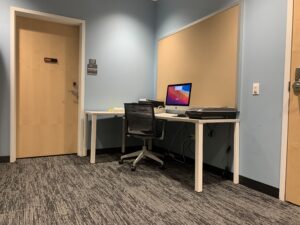
Equipment:
- Archival Scanner
- Analog to Digital Converter
- Cassette Player
- DVD Burner
- Headphones
- iMac
- MiniDV Camcorder
- Super 8/8mm Conversion Kit
- VHS to DVD Converter
Software Available:
- Adobe Creative Suite
- Elgato Video Capture
- Final Cut Pro
- GarageBand
- iMovie
- Logic Cut Pro
- Inkscape
- Silhouette Studio
- Blender
Project Ideas:
- Convert audio cassettes to digital
- Convert Super8 or 8mm film to a digital file
- Convert VHS tapes to DVD or a digital file
- Edit your videos or sound
- Scan old film or pictures to a digital format
sound lab
1-4 people
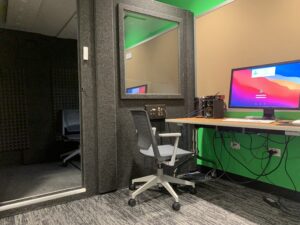
Equipment:
- 12 Channel Sound Mixer
- Focusrite Scarlett 2i2
- iRig
- Mac Pro
- Mic Stands
- MIDI Keyboard Controller
- Tabletop Sound Shield
- WhisperRoom Sound Booth
- XLR & Electric Instrument Cables
Software Available:
- Adobe Creative Suite
- Final Cut Pro
- GarageBand
- iMovie
- Logic Pro
Project Ideas:
- Record a podcast
- Record new music
Reservations and room usage
- Ages 9 years and older.
- Registered library card required (ITPLD card or another library card that is registered in our library).
- Reserve a room for up to three hours up to seven days in advance in person or online.
- Reservations must be made at least 30 minutes before closing time.
- The Digital Media Labs remain unlocked during the open hours. Take your belongings if you leave the room at any time during your reservation.
- All created content must be saved or exported at the end of a session. Files can’t be stored on the computers in the Digital Media Labs for longer than the duration of a reservation.
File Storage
All created content must be saved or exported at the end of a session. Files can’t be stored on the computers in the Digital Media Labs for longer than the duration of a reservation. We recommend saving as often as possible. The hard drive will be wiped when the computer restarts.